Bills read for you, paid on your rules.
Drop in a PDF or a photo. The payee, amount, due date and payment details are read off it, a duplicate is caught before it is paid twice, and nothing leaves until the people you chose approve it.
From invoice to paid, on one record.
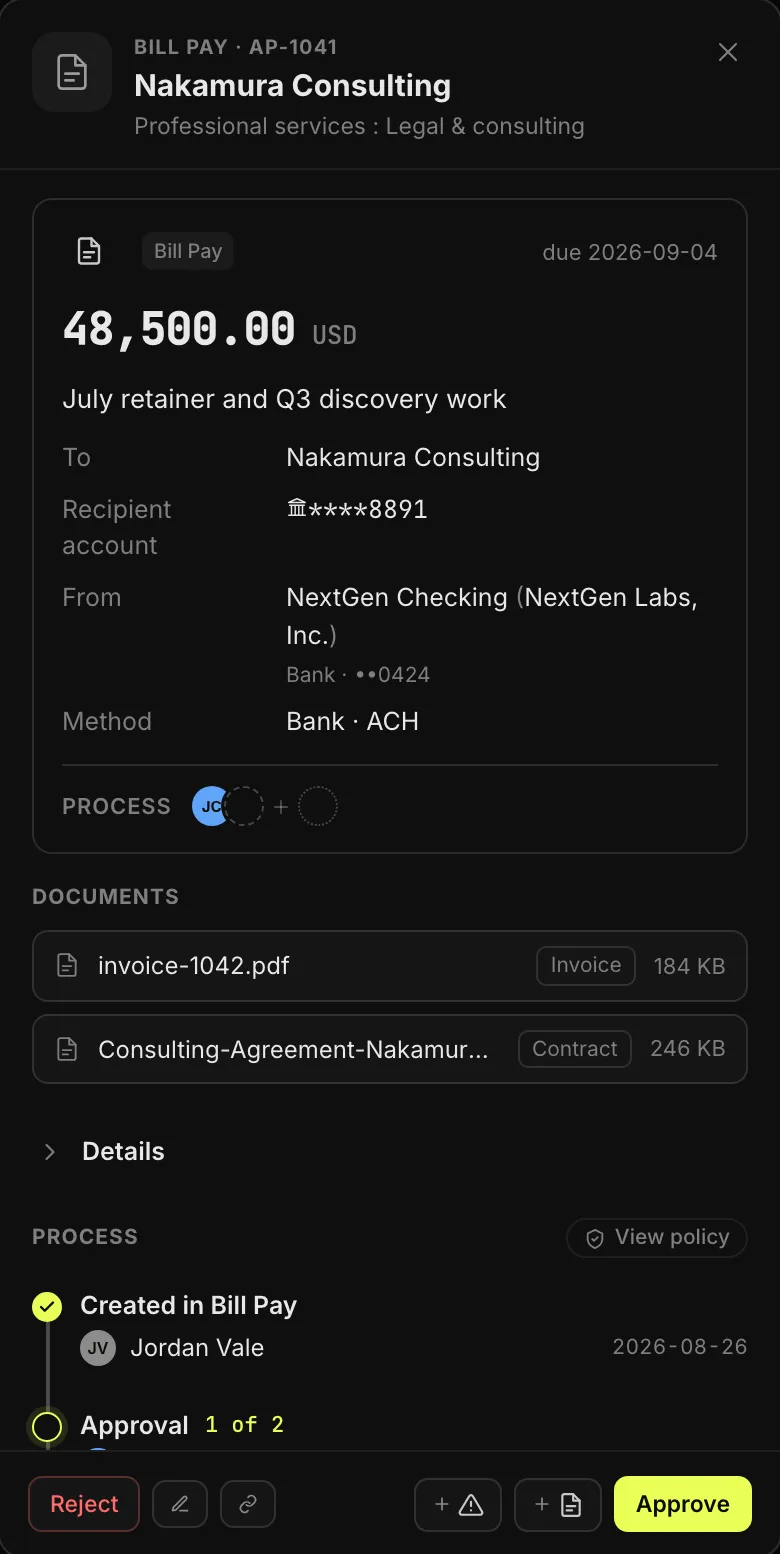
Pay a vendor's bank by ACH from your Universal Account, or a contractor's wallet from your Safe or a connected wallet. Either way the bill is read for you, approved by your rules, and kept as the record of what was paid and why.
Try it Pick an invoice, then step through it.
inv-1042.pdf
Nakamura Consulting
Bill to: NextGen Labs, Inc.
- October retainer40,000.00
- Discovery workshop × 28,500.00
Total48,500.00 USD
Read off the invoice
- Payee
- Nakamura Consulting Existing contact
- Billed to
- NextGen Labs, Inc.
- Amount
- 48,500.00 USD
- Invoice
- INV-1042 · issued Oct 1
- Due
- Oct 31
- Line items
- 2, with amounts
- Pay to
- Bank ••8891ACH, read off the invoice
No other bill from Nakamura Consulting under INV-1042.
What gets read off the invoice.
| Read automatically | Why it matters |
|---|---|
| Payee, with their address and contact details | Matched to a contact you already have, or started as a new one |
| Which of your entities is being billed | The bill lands on the right entity's books |
| Amount and currency | Nobody retypes a number |
| Invoice number, issue date and due date | Filed, searchable, and checked for duplicates |
| Line items, with quantity and unit price | What was bought, not just the total |
| The bank account or wallet to pay | Read off the invoice, then checked against the contact |
PDF, PNG or JPG. Every upload is scanned for malware before anything reads it, and you check the result before you submit. A new payee starts as a contact, with their own checks.
Fast for your team, hard to fool.
-
Paid twice? Caught first.
If the same payee already has a bill under that invoice number, the review says so and links to it before you submit.
-
Nothing leaves unapproved
Submitting sends the bill to the people your approval rules name. Each approval needs a different person, and one rejection stops it.
-
Screened before it sends
A wallet payment is checked against the OFAC sanctions list before it leaves, and a wallet nobody has verified is flagged to every approver.
-
One record, start to finish
The invoice PDF, the contract, every approval and the payment itself live on the bill. Nothing to reconcile from three places.
Due dates and repeat bills.
Every bill carries its due date, so your team sees what is due and when. For a bill that comes back, like rent or a retainer, turn on recurring in the same form: weekly, every two weeks, monthly, quarterly or yearly, until cancelled or until an end date. Each one is raised two days before it is due and approved like any other, and every series sits in Recurring Payments, where you can change or cancel it.
Set it up once.
Set the defaults once, for the whole organization, and every new bill starts from them.
- Paying account: the Universal Account, Safe or bank a bill leaves from unless someone picks another.
- Payment method: the rail a bill goes out on by default. ACH, out of the box.
- Required fields: what your team must fill in before a bill can be submitted, from the invoice number to an attached document.
- Duplicate check: on by default, for every bill.
Every change to a bill, and every approval, lands in the activity log.
Sending invoices instead? Send Invoices No invoice? Quick Pay
Universal Accounts are provided by 1Money USA, Inc. Mezzanine is a Referral Partner of 1Money.