Execution within your limits.
Mezzanine checks each payment against your rules, collects the required approvals, and executes the transfer once authorized.
See the approval engine in action.
Try it Change the payment type, drag the amount, switch the account.
$25,000 to $250,000
- FinanceAny one person in this roleWaiting
- Finance or AdminSomeone who has not approved yetWaiting
Universal Account
- AdminFirst signatureWaiting
- Admin or FinanceSecond signatureWaiting
Signed in Mezzanine. Universal Accounts are provided by 1Money USA, Inc.
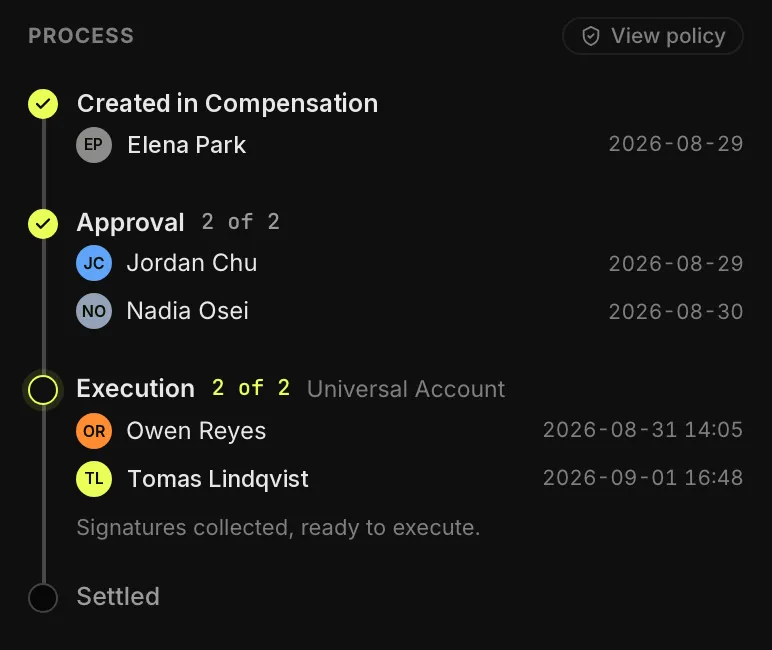
Before it can leave: 2 approvals from 2 different people. Then 2 signatures on the Universal Account.
An example policy. Out of the box every tier needs one approval from an Admin or Owner; set your own tiers, limits and approvers.
Every payment goes through the right people.
Mezzanine enforces your approval rules, routes payments to the right people, and then executes automatically.
- Step 1
Create
Raise the payment with its invoice or contract attached. Raising it releases nothing.
- Step 2
Approve
Mezzanine collects approvals from different people. One rejection stops the payment. The bigger the payment, the more names it needs.
- Step 3
Execute
Authorized signers release the funds. Payments made outside of Mezzanine are marked sent or failed, keeping the record up to date.
What it protects you from
-
Fraud
A forged invoice, a spoofed request, or a business email compromise (the “our bank details have changed” email) has to convince more than one person before money moves.
-
Mistakes
A wrong amount or the wrong recipient gets a second look while it can still be fixed, not after it has left.
-
Insider risk
Past the thresholds you set, nobody releases a payment alone. Not a new hire, and not the founder.
An audit trail on every payment.
Every payment carries its own audit trail: who raised it, who approved it and when, who signed it, and when it settled. Five people touched this compensation run, and each one is on the record.
Changes to the rules themselves are recorded too, in the activity log.