Recurring payments without recurring work.
Schedule payments once. Mezzanine prepares each payment before it's due and routes it through your usual approvals with time to spare.
Ready ahead for your approval.
Mezzanine prepares each payment two days before it's due and sends it through your usual approvals before funds move.
Try it Change the frequency, set an end date, or cancel the series.
Schedule · Bill Pay
Northbridge Audit LLP
4,200.00 USD by ACH, from the Universal Account
Next due dates
- Nov 5Nov 3: draft raisedRaised, waiting for approval
- Dec 5Dec 3: draft raisedWill be raised for approval
- Jan 5Jan 3: draft raisedWill be raised for approval
- Feb 5Feb 3: draft raisedWill be raised for approval
Runs until someone cancels it.
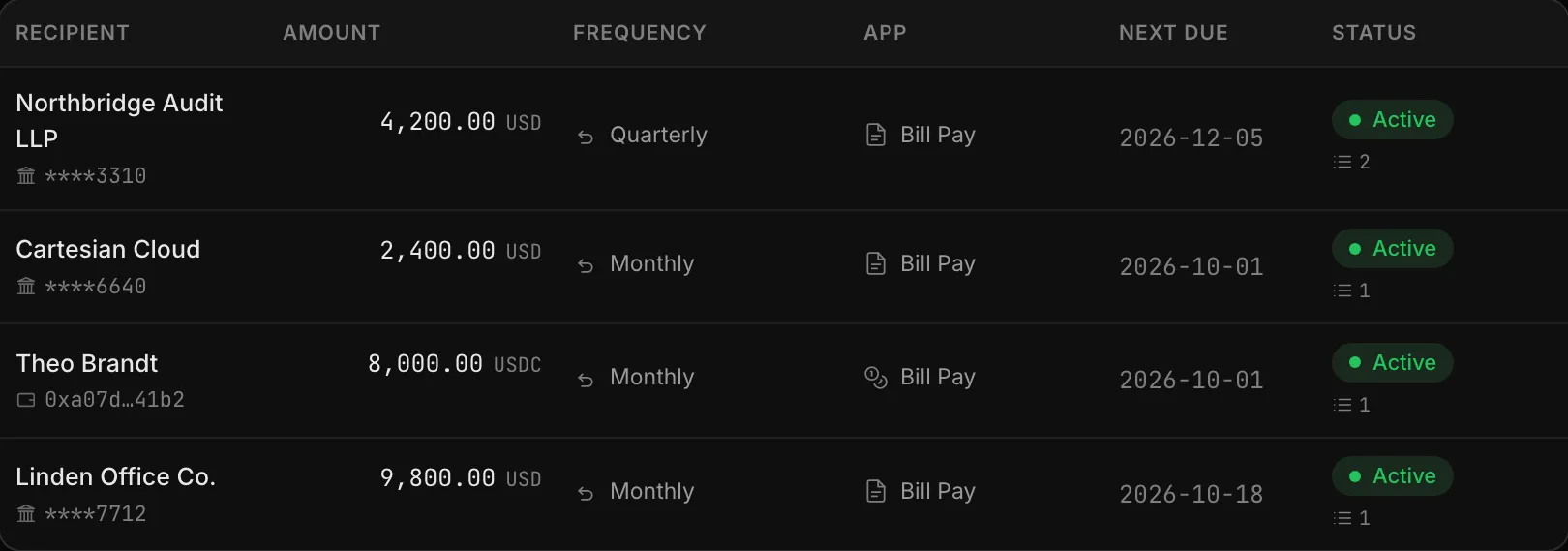
See what's scheduled and manage what's next.
Review recurring bills and transfers across all your accounts, with amounts, frequencies, and upcoming payments together.
In your control, the whole way.
-
Change it
Edit the amount, the frequency or the end date of a series, without starting it again.
-
Stop it
Cancel a series at any point. Future payments stop; the ones already raised stay where they are, still waiting for approval, and can be rejected like any other.
-
Know who did
Who set it up, who changed it, who cancelled it and when, on the schedule and in the activity log.
Paying your people See upcoming payments in your projections
Universal Accounts are provided by 1Money USA, Inc. Mezzanine is a Referral Partner of 1Money.