Financial authority under your control.
Set exactly who can view, create, approve, and move money. Mezzanine enforces your limits automatically across every account and entity.
Built-in roles, ready to use.
Mezzanine comes with five native roles: Owner, Admin, Finance, Operations, and Legal. Assign people to their roles, and their access is automatically applied and updated as roles change.
Try it Pick a group to see what it can do.
Finance Moves money.
Can, by default
- Propose bill payments and internal transfers
- Propose swaps
- Manage recurring payments and payment requests
- Start wallet verifications
- View sensitive contact details
Cannot, by default
- Edit permissions or approval policies
- Manage the team
Approving payments is on no group's list: it comes from your approval rules. Most defaults can be changed, and you can add groups of your own.
Owners hold full access and are the only people who can appoint or remove Admins. Access requests go through an approval. Permission changes are staged until someone saves them, and each one is recorded in the activity log.
Customize permissions to match how your company actually works.
-
Granted to a group
Give a permission to Finance, Legal or any group you create, and everyone in it has it.
-
Granted to everyone
Some things the whole team should see. Say so once.
-
Set by your approval rules
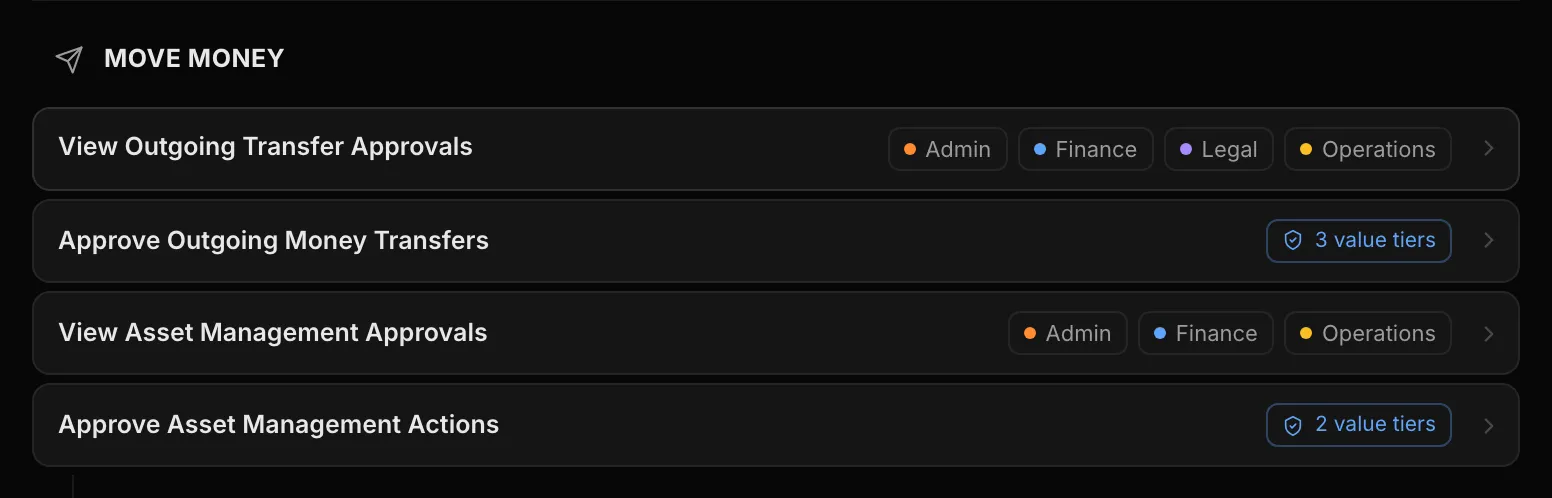
Approving money is not a group grant. Who signs scales with the amount, through the Approval & Execution Engine.
-
Set on each file
Company files carry their own view and edit permissions, starting from sensible defaults.
Seeing is not approving.
Your bookkeeper can see the books without seeing an approve button. Viewing outgoing payment approvals is granted to groups; approving them is set by value tiers, so the person who can see a payment is not automatically the person who can release it.